Open Science
1 Overview
We, as a lab, value and strive to advance the mission of open science to improve the accessibility, reproducibility, and replicability of science. As such, all lab members are expected to conduct research transparently and to promote reproducibility. This includes, but is not limited to, pre- or co-registering studies, sharing analysis scripts and data, using version control (GitLab), submitting preprints when submitting a manuscript to a journal, and providing support for other labs’ attempts to replicate and reproduce our findings. Our lab’s template for projects on the Open Science Framework (OSF) is located here1: https://osf.io/4w9sv.
Here is a schematic depicting the overall process before and after writing a manuscript: 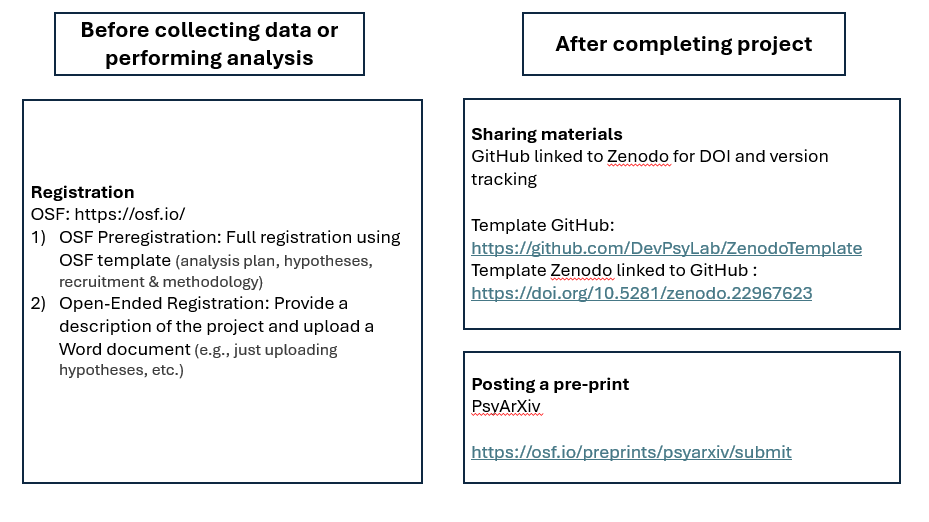
2 Pre-Registration (or Co-Registration)
There is a continuum of registration approaches. Pre-registration involves publicly posting aspects of a study (e.g., study design, hypotheses, methods, materials, and analysis plan) before data collection begins. Co-registration involves specifying aspects of your study after data collection starts but before analysis. Post-registration involves specifying aspects of your study after after analysis has begun.
Pre-registration is often considered the gold-standard. However, co-registration and post-registration are better than no registration.
Here are elements of a study that can be registered:
- study design
- hypotheses
- methods
- materials
- analysis plan
When analysis decisions are contingent upon prior steps that may influence which decision to take, the analysis plan can include decision trees (e.g., if X, then Y; if A, then B). For example, you can specify how you would proceed if the measures do not demonstrate longitudinal factorial invariance, or how you would handle poorly fitting models.
For templates of pre-registrations, see here (archived at: https://perma.cc/6DWT-YPXW). For guidance on selecting a template, see here (archived at: https://perma.cc/773X-F9H4). When you have a pre-registration for a project, post it on one of the following services:
- Open Science Framework (OSF)
- either via their registration platform or via a PDF of a Word document
- In the GitHub repository associated with the project
- AsPredicted
- PROSPERO (for systematic reviews)
- ClinicalTrials.gov
We most commonly post pre-registrations on the OSF.
3 Sharing Data, Analysis Code, and Research Materials
3.1 Data
When sharing data, make sure to share only deidentified data. For any variables that have participant-identifying information, make sure to remove them from the data object before sharing.
To help protect participant anonymity, it is important to anonymize participant IDs so their data cannot be stitched together across papers. To anonymize participant IDs, use the following script and change the seed for every paper so that a given participant gets a different anonymized code each time.
https://devpsylab.github.io/DataAnalysis/openScience.html#sec-anonymizedID
3.2 Data Dictionary
For each study, we create a Data Dictionary. A Data Dictionary is a metadata file that tells people the meaning of variables in the data file and how to interpret them.
For each paper project, we export a .csv file with the subset of the Data Dictionary variables used for that specific paper. We upload that .csv file to the GitHub repository.
3.2.1 Style Guide
- Use Roboto font size 10
- Use an en dash (
–; i.e., not a hyphen) to indicate a range:- e.g., 1–18 (not 1-18)
- an en dash is technically correct; in addition, spreadsheets often read 3-7 as March 7th, but they correctly read 3–7
3.2.2 Columns
The Data Dictionary should have the following columns:
- Variable Name
- the variable name in the data file
- Form Name
- the instrument or measure that the variable comes from
- Human-Readable Variable Name
- a more easily readable version of the variable name
- Data Type
- the format of the values in the column (e.g., string, binary, integer, numeric, date, time, etc.)
- Variable Type
- whether the scale of measurement is nominal, ordinal, interval, or ratio
- Measurement Unit
- the conceptual unit that is being measured (e.g., seconds, level, count)
- Allowed Values
- the allowed values for a variable and (if possible), what conceptual level each value corresponds to (e.g., 0 = Male; 1 = Female)
- Description
- conceptual description of the variable
- Definition
- definitions of abbreviations, conceptual definitions of terms, mathematical definitions of how a variable is calculated, etc.
- Notes
- additional notes about the variable and how it is calculated
- References
- references for the measure and/or variable
3.2.2.1 Data Types
Data Types include:
- string
- include letters or other characters (and possibly numbers)
- factor
- categorical variable with letters and/or numbers
- binary
- 0/1
- integer
- whole numbers (never decimals)
- numeric
- numbers
- date
MM/DD/YYYY; e.g., 06/24/2020
- time
HH:MM:SS(e.g., 01:30:24), orHH:MM(e.g., 05:24), orMM:SS
- date-time
MM/DD/YYYY HH:MM:SS(e.g., 06/24/2020 01:30:24)
3.2.2.2 Variable Types
Variable Types include:
- nominal
- distinct categories
- ordinal
- ordered categories
- interval
- ordered with meaningful distances
- ratio
- ordered with meaningful distances and an absolute zero
3.2.2.3 Measurement Units
Measurement Units include:
- ID
- participant identification (ID) numbers
- count
- number of something (e.g., number of children in the household)
- group
- categories that reflect different groups (e.g., female vs male)
- instance
- nominal categories that do not reflect groups
- yes/no
- 0 = No; 1 = Yes
- ratio
- ratio of two variables (one variable divided by another variable)
- USD
- U.S. dollars ($)
- option
- categories that reflect participant’s choice among multiple options
- location
- categories that reflect different locations
- state
- categories that reflect a status
- degree
- the degree of
- level
- the level of
- grade
- school grade
- date
MM/DD/YYYY; e.g., 06/24/2020
- time
HH:MM:SS(e.g., 01:30:24), orHH:MM(e.g., 05:24), orMM:SS
- date-time
MM/DD/YYYY HH:MM:SS(e.g., 06/24/2020 01:30:24)
- milliseconds
- seconds
- minutes
- hours
- days
- months
- years
- percentile
- item
3.2.3 Analysis Code
We can share analysis code for any text-based files, such as:
R:.R,.qmd,.rmdPython:.py,.ipynbMATLAB:.mSPSS:.sps
When sharing analysis code, where possible, it is helpful to share computational notebooks—i.e., analysis code in line with output. That way, anyone can see what the output was of each line of code without having to run it themselves. For instance, it can be helpful to share Quarto (.qmd) documents and the associated .html file with the output inline. Our lab’s template for Quarto documents is here2: https://research-git.uiowa.edu/PetersenLab/Template/-/blob/master/Analyses/quartoNotebook.qmd. Make sure the computational notebook does not include participant-identifying information as output.
3.2.4 Research Materials
Where possible (e.g., when it does not violate copyright), we prefer to share research materials (e.g., stimuli, tasks, procedure manuals, coding manuals, etc.).
4 Version Control
For projects involving human subjects data, we use the UI Enterprise Instance of GitLab for version control. See our lab’s guide for using git/GitLab. Our lab’s template for GitLab repositories is located here3: https://research-git.uiowa.edu/PetersenLab/Template.
5 Preprint
When submitting a manuscript to a journal, also submit a preprint to PsyArXiv. Combine the supplemental material and manuscript into one PDF file when posting. When submitting the manuscript to the journal, make sure to indicate in the cover letter that the manuscript was posted as a preprint, and provide the link to the preprint.
6 Services
6.1 OSF
The Open Science Framework (OSF) is a website for hosting pre-registrations—and formerly data, analysis code, research-related materials, and preprints—to improve replicability and reproducibility of findings. Our lab’s template for projects on the Open Science Framework (OSF) can be found here4: https://osf.io/4w9sv.
6.1.1 Create Anonymous View-Only Links for Anonymous Peer Review
With your project open, go to Settings (top-right) → View-Only Links → Add. Then check “Anonymize”. Then you can share that URL. For detailed instructions, see here: https://help.osf.io/article/201-create-a-view-only-link-for-a-project (archived at https://perma.cc/AGJ9-V487).
6.2 GitHub
GitHub is a website for hosting and sharing files, and can be used to share pre-registrations, (deidentified) data, analysis code, research-related materials, and preprints to improve replicability and reproducibility of findings. For projects involving human subjects data, we use the UI Enterprise Instance of GitLab (not GitHub) for version control, as described in Section 4. Then, for sharing (deidentified) data (and data dictionary), analysis code (and computational notebooks), research-related materials, and preprints, we use GitHub paired with Zenodo (to obtain a persistent link via DOI). That is, you will copy deidentified data and analysis code from the GitLab repository to a new GitHub repository (along with adding a data dictionary, other research-related materials, preprints, etc.), for purposes of sharing.
For each paper project, create a new repository on GitHub and add the relevant contributors, including Dr. Petersen. Our lab’s template for projects on GitHub can be found here: https://github.com/DevPsyLab/ZenodoTemplate. When we are ready to share the files (which may depend on whether the journal uses a blind review process), make the GitHub repository public and link the GitHub repository to Zenodo to obtain a DOI, as described here. The Zenodo project for the lab’s template project is here: https://doi.org/10.5281/zenodo.22967623. Individual files in GitHub repositories cannot exceed 100 MB in size.
6.2.1 Pre-Registration
For information on posting a pre-registration, see here.
6.2.2 Data
6.2.3 Data Dictionary
For information on creating and sharing a data dictionary, see here. For each paper project, we export a .csv file with the subset of the Data Dictionary variables used for that specific paper. We upload that .csv file to the GitHub repository. The formatting of the Data Dictionary is described here.
6.2.4 Analysis Code
For information on sharing analysis code, see here.
6.2.5 Research Materials
For information on sharing research materials, see here.
6.2.6 Preprint
For information on sharing preprints, see here. A preprint can also be included in a GitHub repository.
6.3 Zenodo
We use Zenodo to create a DOI for GitHub repositories. For instructions how to share and preserve research materials and code via GitHub with a DOI, see here: https://www.lib.uiowa.edu/data/share-and-preserve-your-code/ (archived at: https://perma.cc/ND4B-W2JF). If you upload files manually to a Zenodo record (rather than via GitHub integration), Zenodo allows up to 100 files per record. If you have more than 100 files, you can either put them in a zip file or can add them by connecting Zenodo to a GitHub repo. Collectively, the files in a Zenodo record cannot exceed 50 GB.
7 Manuscript Submission to a Journal
Before submitting a manuscript to a journal, make sure the pre-registration is posted and make sure to post the relevant materials on a GitHub, as described here, and post the preprint, as described here. When preparing a manuscript for submission to a journal, make sure to follow the Author Guidelines for each journal. After finalizing the manuscript in accordance with journal guidelines and when you are ready to submit the paper to the journal (but before submission), post the preprint on PsyArXiv. Include the link to the preprint in the cover letter to the journal. In the Method section and on the title page, include the relevant links to the pre-registration, data, data dictionary, analysis code, computational notebook, and research materials, etc. For example:
Hypotheses and measures for the School Readiness Study were pre-registered: https://osf.io/jzxb8. Hypotheses methods, and a data analysis plan for the present study were also pre-registered: https://osf.io/pny26. Data files, a data dictionary, analysis scripts, and a computational notebook for the present study are published online: https://osf.io/zs2bn.
In the manuscript submission, create and use anonymous view-only OSF links (for blind review). In the preprint submission, use the general OSF/Zenodo/GitHub links (not the anonymous view-only OSF links) that will become viewable when the manuscript is accepted for publication (i.e., when you make the OSF repository public).
8 When the Manuscript is Accepted for Publication
When the manuscript is accepted for publication:
- Let all of the authors know, and send them the full, (in-press) APA-style reference
- Make the GitHub repository public and link the repository to Zenodo to create a DOI link (archived at: https://perma.cc/ND4B-W2JF) for the repository that can be used for citing it
- Submit the finalized, unblinded manuscript (and any tables, figures, and the supplement; with the public GitHub link; removing any highlighting or tracked changes) to the NIHMS system: https://www.nihms.nih.gov/submission/create/
- After you submit the manuscript to NIHMS, send Dr. Petersen the NIHMS ID for the submission. We are required to report published papers to funding agencies.
- Make sure the finalized, unblinded manuscript (and any tables, figures, and the supplement; with the public GitHub/Zenodo link; removing any highlighting or tracked changes) is uploaded as an updated version of the preprint on PsyArXiv.
9 Adapting Open Science to Longitudinal Research
See our paper on adapting open science to longitudinal research: https://onlinelibrary.wiley.com/doi/10.1002/icd.2315